Transportation Hub Planning Scale Model
Introduction
A transportation hub is a city’s gateway.
Trains, buses, taxis, bikes, pedestrians – all converging in one place.
Poor design creates chaos.
Good design moves millions seamlessly.
How do you test passenger flow, transfer distances, and emergency exits before construction?
Digital simulations help, but they lack physical intuition.
You need a model.
Specifically, a Transportation Hub Planning Scale Model.
This guide explains why hubs need dedicated models.
What features to include.
And how to use them for better transit design.
Let us begin.
What Is a Transportation Hub Planning Scale Model?
It is a physical miniature of a multimodal interchange.
Built on a sand‑textured or solid base.
A Transportation Hub Planning Scale Model shows train platforms, bus bays, taxi queues, bike parking, pedestrian walkways, and transit-oriented development (TOD) around the hub.
Unlike a city‑wide model, this one zooms in on circulation.
Transfer distances are measured.
Bottlenecks are identified.
The model is used by transit authorities, station architects, and urban planners.
Why Transportation Hubs Need Physical Models
Hubs are among the most complex public spaces.
A mistake in platform placement can add minutes to every transfer – multiplied by millions of passengers.
A Transportation Hub Planning Scale Model reveals spatial relationships that digital screens hide.
Planners see how a new escalator connects to a bus terminal.
They test wheelchair access from train to taxi.
Also, the model supports public engagement.
Commuters point at confusing intersections.
They understand proposed improvements.
For funding approvals, a clear model demonstrates passenger benefits.
Key Features of a Transportation Hub Sand Table Model
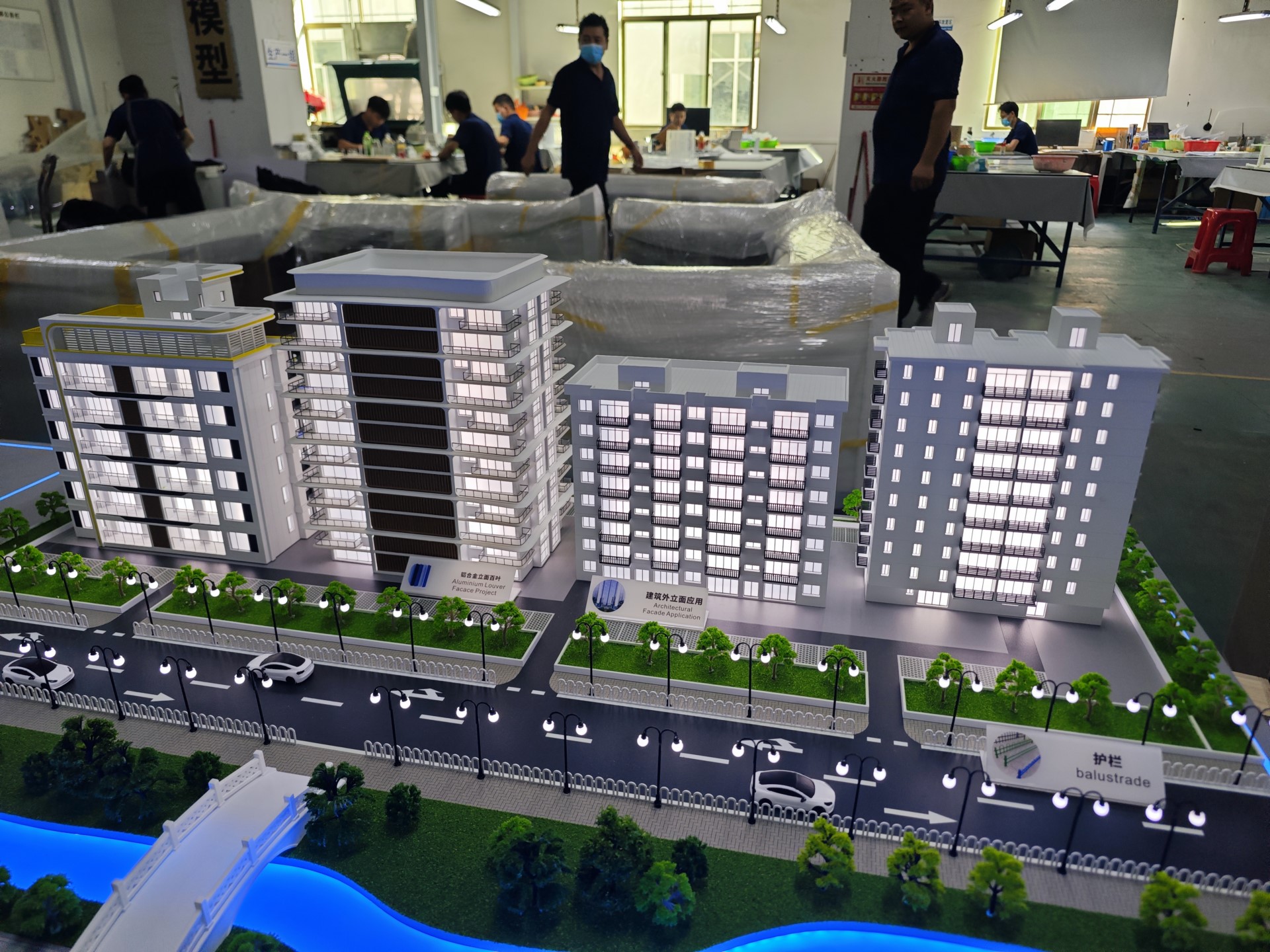
Let us break down what makes a model effective for hub planning.
Multimodal Zones
Train platforms, bus gates, taxi stands, ride‑share pickup, bike parking, pedestrian plazas.
Each mode in a distinct color or texture.
Transfer Paths
Shortest walking routes between modes.
Measured distances marked on the model.
Vertical Circulation
Stairs, escalators, elevators, ramps.
Shown with arrows or distinct symbols.
Passenger Flow and Queuing
Boarding queues, ticket lines, security checkpoints.
Represented with striped zones or small LED indicators.
Emergency Exits and Evacuation Routes
Clearly marked in red.
Critical for safety reviews.
Transit‑Oriented Development (TOD)
Retail, offices, housing adjacent to the hub.
Shown as simple massing blocks.
Wayfinding and Signage (Optional)
Information kiosks, digital signs, maps.
Indicated with small symbols.
Interactive Flow Simulation
LEDs that light up in sequence to show passenger movement.
Removable overlays for different demand scenarios.
A well‑designed Transportation Hub Planning Scale Model answers: “Can 50,000 passengers transfer safely and efficiently?”
Materials for Transportation Hub Models
Hub models emphasize clarity of circulation.
Laser‑cut MDF or acrylic – For building massing and platforms.
Colored acrylic sheets – For multimodal zones (blue for rail, green for bus, yellow for taxi).
Fine sand or textured paint – For ground and open spaces.
Printed vinyl – For transfer distance markers and symbols.
Thin acrylic rods – For escalators and stairs.
Micro LEDs – For passenger flow simulation (optional).
Avoid decorative landscaping – focus on circulation.
The Custom Production Process: Step by Step
How is a transportation hub planning model made?
Here is the typical workflow.
Step 1: Hub Design Data Review
You provide platform layouts, transfer level plans, passenger flow models, and TOD site plans.
The model maker identifies key circulation paths.
Step 2: Scale Selection
Common scales: 1:200 to 1:500.
1:200 for a detailed station interior.
1:400 for a hub with surrounding development.
Step 3: Base and Context
A reinforced MDF base is cut.
Surrounding streets and buildings added as simple blocks.
Step 4: Platform and Modal Zones
Train platforms, bus bays, taxi queues laid out in distinct colors.
Step 5: Vertical Circulation and Transfer Paths
Stairs, escalators, elevators added.
Walking distances marked with dashed lines or measured labels.
Step 6: Passenger Queuing and Security
Ticket lines, security checkpoints, boarding gates indicated.
Step 7: Emergency and Evacuation
Exits and evacuation routes marked in red.
Step 8: TOD and Amenities
Adjacent retail, offices, housing added as massing blocks.
Step 9: Interactivity (Optional)
LED flow simulation along main transfer corridors.
Step 10: Quality Control and Cover
The model is inspected for legibility.
A clear acrylic cover or low railing is added.
A custom Transportation Hub Planning Scale Model typically takes 8 to 12 weeks.
Applications for Transportation Hub Models
Where are these models used?
Transit Authority Planning
Test transfer distances and passenger flow.
Coordinate with bus, rail, and taxi operators.
Station Design and Architecture
Refine platform placement and vertical circulation.
Public Engagement and Commuter Workshops
Riders point at confusing areas.
Feedback improves wayfinding.
Safety and Emergency Drills
Train staff using the physical model.
Identify evacuation bottlenecks.
Funding and Grant Applications
Demonstrate passenger benefits to state and federal agencies.
Integration with Other Planning Model Types
An Urban Renewal Planning Sand Table Model might include a new transit hub in a revitalized district – your hub model provides the detailed circulation.
Case Study: Hub Model Reduces Transfer Time by 40%
A regional transit authority planned a new multimodal hub connecting rail, bus, and light rail.
Initial designs had long transfer walks.
They commissioned a Transportation Hub Planning Scale Model at 1:250 scale.
The model showed platforms, escalators, and transfer paths.
Planners physically walked the model with small figures.
They discovered that a direct escalator from the train platform to the bus terminal could save 3 minutes per transfer.
The design was changed.
Post‑opening data showed average transfer time reduced by 40%.
The model cost 2 million.
Cost Factors for Transportation Hub Models
Area covered – The hub itself vs. hub plus surrounding TOD.
Scale – 1:200 (more detail) costs more than 1:500.
Modal complexity – Rail+bus+taxi+bike vs. just rail+bus.
Circulation detail – Basic paths vs. measured distances and queuing zones.
Interactivity – Static vs. LED flow simulation.
Typical range: 50,000 for a large, multimodal hub with TOD and LED flow simulation.
How to Choose a Model Maker for Hub Projects
Experience with transit or circulation models – Not just building massing.
Understanding of passenger flow terminology – They must know transfer distances and queuing.
Ability to show vertical circulation clearly – Escalators and stairs must be readable.
References from transit authorities or station architects – Call two.
Ask for a sample of how they represent an escalator and a transfer path with measured distance.
Maintaining and Updating Your Hub Model
Hub designs evolve as transit schedules and passenger patterns change.
Use removable transfer path overlays – Update walking distances.
Replaceable modal zone stickers – Change bus gate assignments.
Annual review – Compare to current passenger counts.
Budget for updates – Every 2–3 years for major service changes.
For a Tourist City Planning Sand Table Model that includes a visitor transit hub, the same modular approach works.
Display Tips for Transit Authority Use
In a Planning Room
Low table for walking around.
Even overhead lighting – no shadows on transfer paths.
For Public Workshops
Place the model on a rolling cart.
Provide laser pointers (non‑laser for eye safety).
Add a legend showing mode colors and transfer distances.
Acrylic Railing, Not Full Cover
Planners need to point and trace routes.
A low railing protects without blocking access.
Common Mistakes to Avoid
Do not forget vertical circulation.
Escalators and stairs are the most critical elements for passenger flow.
Do not make transfer distances ambiguous.
Measure and label key walking paths.
Do not ignore queuing zones.
Ticket lines and security checkpoints cause bottlenecks – show them.
Do not use the same color for different modes.
Rail, bus, and taxi must be visually distinct.
Do not skip a legend.
Without a legend, viewers cannot interpret mode colors or evacuation routes.
Integrating with Other Planning Model Types
A transportation hub model often works alongside specialized models for broader planning contexts.
A Smart City Urban Planning Architectural Model might overlay real‑time passenger data and digital signage – your hub model provides the physical circulation.
An Ecological City Planning Sand Table Model could add green transit (light rail, bike‑share) and tree‑lined pedestrian paths to the hub surrounds.
A Town Planning Scale Model for the municipality shows where the hub fits in the broader street network.
For a hub in a tourist city, a Tourist City Planning Sand Table Model would highlight visitor information kiosks and luggage storage – your hub model focuses on the core circulation.
For a hub within a redevelopment area, an Urban Renewal Planning Sand Table Model would show phased construction and temporary access – your hub model is the final design.
Each type serves a different purpose. The transportation hub model is the critical link between regional transit and local land use.
Future Trends in Transportation Hub Sand Table Models
Real‑time passenger data – LEDs show congestion levels at different times of day.
Augmented reality – Scan the model to see projected pedestrian flow from digital simulations.
Modular platform sections – Swap out track layouts for phased construction.
Sustainable materials – Recycled acrylic for eco‑friendly transit projects.
Yet the core remains.
Transit planners need to see and measure physical space.
A physical model does that best.
Conclusion
A Transportation Hub Planning Scale Model is an essential tool for designing efficient, safe, and passenger‑friendly interchanges.
It reveals bottlenecks, measures transfer distances, and builds stakeholder consensus.
Focus on modal zones, vertical circulation, and passenger queuing.
Add measured transfer paths and emergency exits.
Use the model in every public workshop.
Whether you are a transit authority, station architect, or infrastructure developer, invest in a hub model.
Your passengers will transfer faster.
Your system will work better.
And remember – whether you need an Urban Renewal Planning Sand Table Model for a station area redevelopment, a Tourist City Planning Sand Table Model for a visitor hub, a Smart City Urban Planning Architectural Model for digital integration, an Ecological City Planning Sand Table Model for green transit, or a Town Planning Scale Model for municipal context, each can incorporate a hub component. But for the intricate circulation of a multimodal interchange, the dedicated transportation hub planning scale model is indispensable.
Model your hub. Move millions.


