City Planning Model for Museum Exhibition
Introduction
Museums are places of learning and wonder.
A city planning model in a museum does something special.
It tells the story of how a place grew.
It shows past, present, and future.
That model must be engaging, durable, and informative.
That is a City Planning Model for Museum Exhibition.
This guide explains why museums use these models.
What features make them exhibition‑ready.
And how to design one that captivates visitors.
Let us begin.
What Is a City Planning Model for Museum Exhibition?
It is a large‑scale, durable physical miniature of a city or district.
Designed for public display in a museum, science center, or visitor attraction.
A City Planning Model for Museum Exhibition shows land use, historic layers, transportation, landmarks, and future growth.
Unlike a working planning model, this one emphasizes storytelling.
It must withstand thousands of visitors.
It must be legible from a distance.
It often includes interactive elements.
The model is used by museum curators, urban history exhibits, and science centers.
Why Museums Exhibit City Planning Models
Museums need engaging exhibits.
A city model draws crowds.
A City Planning Model for Museum Exhibition helps visitors understand:
How their city evolved over time.
Where different neighborhoods are located.
How transportation shaped growth.
What future developments are planned.
Also, a model encourages civic dialogue.
Visitors point at their own streets.
They ask questions about future projects.
For museums, a well‑designed model becomes a permanent attraction.
Key Features of a Museum‑Ready City Model
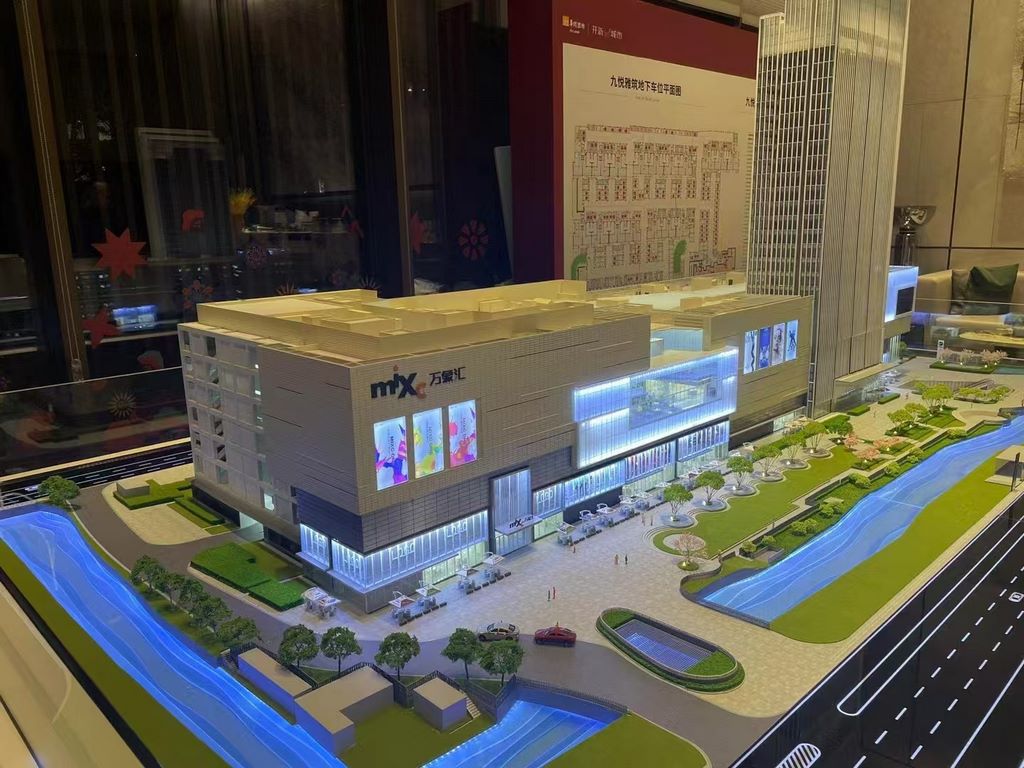
Let us break down what makes a model suitable for public exhibition.
Durable Construction
Thousands of hands will touch the railing.
Buildings must be securely glued.
Base must be reinforced.
Acrylic cover or low railing essential.
Large Scale but Readable
Scale typically 1:1,000 to 1:5,000.
Landmarks and major roads visible from 1 meter away.
Clear Legend and Labels
Large, easy‑to‑read text.
Icons instead of words where possible.
Legend panel separate from model.
Historical and Future Layers
Show how the city looked in 1900, 1950, and today.
Future growth areas distinguished.
Interactive Elements (Optional)
Push‑buttons that light up different eras.
Touch screen with additional information.
QR codes linking to archival photos.
Accessibility
Model at waist height for children and wheelchair users.
Good lighting without glare.
Educational Focus
Not every pipe and utility line is shown.
Emphasis on big stories: immigration, industry, transit, housing.
A well‑designed City Planning Model for Museum Exhibition turns urban planning into a public conversation.
Materials for Museum Exhibition Models
Museum models prioritize durability and visual clarity.
Reinforced MDF or aluminum base – Warp‑resistant.
Laser‑cut acrylic – For building massing and landmarks.
3D printed resin – For historic buildings and fine details.
Colored acrylic sheets – For land use zones.
Fine sand or textured paint – For ground.
Blue resin – For water bodies.
Printed vinyl – For labels and legends.
Low‑voltage LEDs – For highlighting (optional).
Durable clear acrylic railing – Protects the model while allowing viewing.
Avoid fragile materials – museum models must last for years.
The Custom Production Process for Museums
How is a museum‑quality city planning model made?
Here is the typical workflow.
Step 1: Exhibit Storyline Development
Museum curators define the narrative – growth of the city, transit revolution, etc.
The model maker identifies what to emphasize.
Step 2: Scale and Table Sizing
Common scales: 1:1,000 to 1:5,000.
Table size typically 2m x 2.5m to 3m x 4m.
Step 3: Base and Terrain
A reinforced base is cut.
Major rivers and hills sculpted.
Step 4: Historical Layers (If Applicable)
Removable overlays showing different eras.
Or separate small models for each period.
Step 5: Land Use and Transport
Color‑coded zones and road networks.
Step 6: Landmarks and Public Facilities
Iconic buildings highlighted.
Referencing a Public Facility Planning Scale Model for hospital and school locations.
Step 7: Future Growth
Distinct color or texture for planned developments.
Step 8: Interactivity
Push‑buttons for lighting different eras.
Touch screen legend.
Step 9: Railing and Lighting
Low acrylic railing installed.
Overhead LED panels for even illumination.
Step 10: Quality Control and Delivery
The model is inspected for legibility and durability.
Shipped in custom crates.
A custom City Planning Model for Museum Exhibition typically takes 12 to 16 weeks.
Applications for Museum City Models
Where are these models displayed?
City History Museums
Show the evolution from village to metropolis.
Science and Technology Centers
Explain urban systems – transportation, utilities, housing.
Visitor and Tourism Centers
Orient tourists to the city layout.
Children’s Museums
Simplified, interactive models with buttons and lights.
University Museums
Educational tool for urban studies students.
Case Study: Museum Model Doubles Attendance in One Year
A city history museum had a static map display that few visitors stopped to see.
They commissioned a City Planning Model for Museum Exhibition at 1:3,000 scale, covering a 3m x 2.5m area.
The model included LED push‑buttons for three eras: 1900 (sepia lights), 1950 (warm white), and today (cool white with blue transit lines).
Visitor engagement increased by 200%.
School groups used the model for field trips.
The museum won a regional exhibit award.
The model cost $68,000.
Attendance doubled in one year.
Cost Factors for Museum Exhibition Models
Area covered – 50 sq km vs. 500 sq km.
Historical layers – Single era vs. multiple removable overlays.
Interactivity – Static vs. push‑button LEDs and touch screens.
Durability requirements – Public‑handling requires reinforced construction.
Railing and lighting – Adds 10–20% to base cost.
Typical range: 130,000 for a large, interactive model with multiple historical layers.
How to Choose a Model Maker for Museum Projects
Experience with museum or public exhibition models – Not just office models.
Ability to design for durability – Must withstand thousands of visitors.
Understanding of storytelling – The model must convey a narrative.
References from museum clients – Call two.
Ask for a sample of a museum model that has been on display for 3+ years.
Maintaining Your Museum Exhibition Model
Museum models need regular care.
Dust the cover weekly – Microfiber cloth.
Check LEDs monthly – Replace burnt bulbs.
Clean the railing and legend panel – Fingerprints accumulate.
Annual professional inspection – Check for loose parts or fading.
For a High Simulation Urban Planning Sand Model used in a museum, the same maintenance applies.
Display Tips for Maximum Visitor Engagement
At Waist Height
Children and wheelchair users can see.
Use a sturdy pedestal.
Even, Non‑Glare Lighting
LED panels from above.
Avoid spotlights that create shadows.
Legend Panel at Reading Height
Place it on a separate pedestal or on the wall.
Use large fonts and simple icons.
Encourage Interaction
Push‑buttons for different eras.
QR codes linking to archival photos.
A small sign: “Press a button to see the city change.”
Staff the Model During Peak Hours
A docent answers questions.
Collects visitor feedback.
Common Mistakes to Avoid
Do not make the legend too small.
Older visitors need large type.
Do not place the model in a dark corner.
Museum lighting must be even.
Do not use technical jargon.
“R‑3 zoning” means nothing to the public – say “low‑density housing.”
Do not forget to label the scale.
“One centimeter equals 50 meters” helps orientation.
Do not allow touching without a railing.
A low railing protects the model without blocking views.
Integrating with Other Model Types in a Museum
A museum may display several related models.
For service equity, a Public Facility Planning Scale Model could be a separate interactive exhibit – showing which neighborhoods have schools and hospitals.
For the big picture, a City Overall Layout Sand Table Model might be the main attraction – your museum model is that.
For dynamic storytelling, an Urban Planning Scale Model with Light System adds phasing animations – perfect for a “future city” section.
For a permanent professional display, a Professional City Sand Table Model is the standard – your museum model should meet that standard.
For ultra‑realism, a High Simulation Urban Planning Sand Model could be a centerpiece – museum visitors love realistic details.
Each type serves a different exhibit theme.
Future Trends in Museum City Planning Models
Augmented reality – Scan the model with a tablet to see historical photos.
Live data – LEDs show real‑time transit or air quality.
Modular sections – Swap out zones as the city changes.
Sustainable materials – Recycled acrylic for eco‑friendly museums.
Yet the core remains.
Museum visitors need to see and touch the story of their city.
A physical model does that best.
Conclusion
A City Planning Model for Museum Exhibition is a powerful educational tool.
It brings urban history and future visions to life for thousands of visitors.
Focus on durability, clarity, and storytelling.
Add interactive elements where budget allows.
Use a low railing and good lighting.
Whether you are a museum curator, exhibit designer, or city historian, invest in a museum‑quality model.
Your visitors will understand their city better.
Your museum will become a destination.
And remember – whether you need a Public Facility Planning Scale Model for a service equity exhibit, a City Overall Layout Sand Table Model for the main hall, an Urban Planning Scale Model with Light System for dynamic shows, a Professional City Sand Table Model for lasting quality, or a High Simulation Urban Planning Sand Model for stunning realism, a museum model can be all of these at once. Start with a clear narrative, then choose the right level of detail.
Model your city for the public. Inspire civic pride.


