Smart City Urban Planning Architectural Model
Introduction
Cities are becoming intelligent.
Sensors, data, and connectivity change how urban systems work.
But how do you plan a city where infrastructure talks?
Digital dashboards are abstract.
You need a physical model.
Specifically, a Smart City Urban Planning Architectural Model.
This guide explains why smart city models matter.
What features to include.
And how to use them for resilient, data‑driven urban development.
Let us begin.
What Is a Smart City Urban Planning Architectural Model?
It is a physical miniature of a connected urban area.
Built on a sand‑textured base.
A Smart City Urban Planning Architectural Model shows physical infrastructure overlaid with smart systems:
IoT sensors, smart grids, autonomous vehicle (AV) networks, data centers, and real‑time monitoring.
Unlike a traditional city model, this one makes invisible technology visible.
LEDs represent data flow.
Fiber optic strands show communication networks.
Colored zones indicate smart grid coverage.
The model is used by urban innovators, technology companies, and government agencies.
Why Smart City Planning Needs a Physical Model
Smart city concepts are hard to explain.
People struggle to understand invisible networks.
A Smart City Urban Planning Architectural Model makes the abstract tangible.
LEDs pulse to show traffic data collection.
Fiber optic strands light up to demonstrate high‑speed connectivity.
It also builds stakeholder consensus.
A city council member sees where sensors will go.
A privacy advocate understands data collection zones.
An investor recognizes efficiency gains.
For public engagement, a glowing, interactive model sparks curiosity and conversation.
Key Features of a Smart City Urban Planning Model
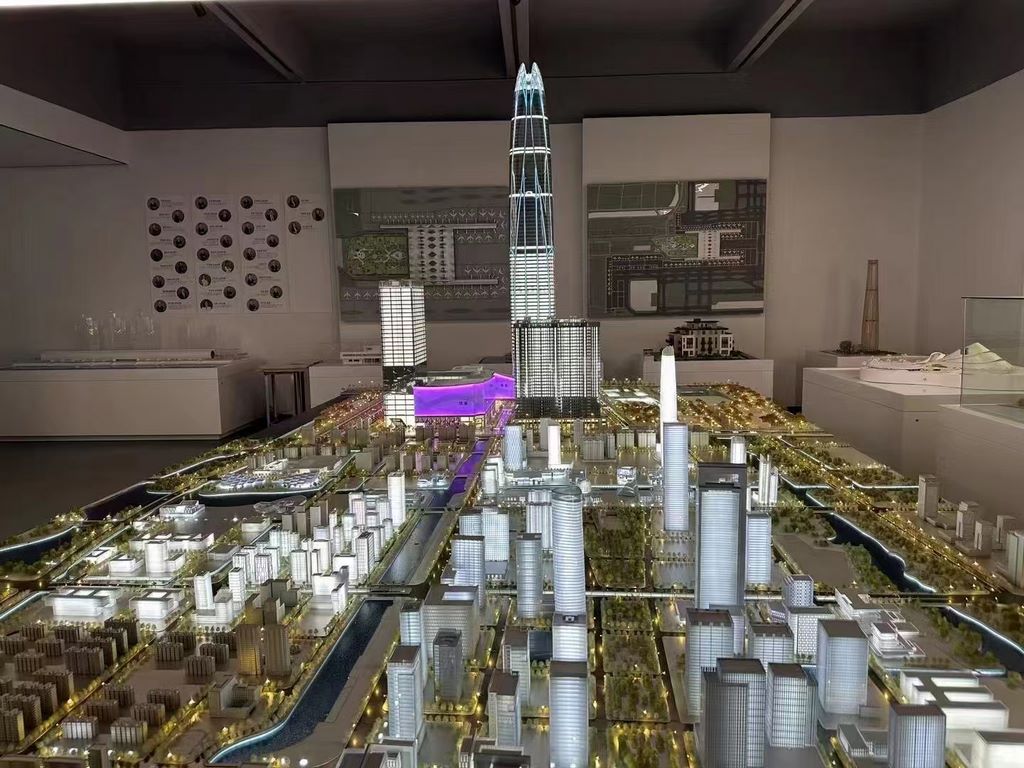
Let us break down what makes a model effective for smart city planning.
IoT Sensor Networks
Small LED nodes or fiber optic dots representing air quality, noise, traffic, and occupancy sensors.
Different colors for different sensor types.
Smart Grid and Energy
Micro‑grid boundaries, battery storage units, solar farm locations, and EV charging hubs.
Glowing paths show energy sharing between buildings.
Autonomous and Connected Mobility
AV lanes, smart traffic signals, connected bus stops, shared mobility hubs.
LED sequences showing vehicle‑to‑infrastructure communication.
Data Centers and Edge Computing
Physical locations of data centers and edge nodes.
Fiber optic trunk lines in distinct colors.
Smart Buildings and Infrastructure
Buildings with responsive facades (represented by translucent panels).
Smart streetlights, waste bins, and parking meters.
Resilience and Disaster Response
Flood sensors, emergency communication towers, automated alert zones.
LEDs that can change color for scenario testing.
Interactive Data Layers
Removable overlays for different smart applications (mobility, energy, safety).
QR codes linking to live city dashboards.
A well‑designed Smart City Urban Planning Architectural Model tells the story of a city that learns and adapts.
Materials for Smart City Models
Smart city models blend physical materials with electronics.
Laser‑cut MDF or acrylic – For building massing blocks.
Cast acrylic – For smart glass facades.
3D printed PLA or resin – For sensor nodes and EV chargers.
Micro LEDs (0402 size) – For sensor indicators and data flow.
Fiber optic strands – For communication networks.
Thin copper tape – For hidden circuitry.
Translucent vinyl overlays – For smart grid zones.
Magnetic base – For interchangeable smart application modules.
Avoid materials that block LED light or conduct heat poorly.
The Custom Production Process: Step by Step
How is a smart city planning model made?
Here is the typical workflow.
Step 1: Smart Technology Mapping
You provide a smart city master plan, sensor locations, and data infrastructure maps.
The model maker identifies key technology layers.
Step 2: Scale Selection
Common scales: 1:1,000 to 1:5,000.
1:1,000 for detailed sensor placement.
1:2,500 for a whole district.
Step 3: Base and Terrain
A reinforced MDF or aluminum base is cut.
Wire channels are routed for LED power and control.
Step 4: Physical Infrastructure
Buildings, roads, and open space are created as simple massing blocks.
This is the “canvas” for smart overlays.
Step 5: Smart Layer Application
Sensor nodes added as tiny LED dots.
Fiber optic lines for communication networks.
Smart grid zones as colored translucent overlays.
Step 6: Mobility and AV Infrastructure
AV lanes marked with distinct colors.
Smart traffic signals represented by small LED‑topped poles.
Step 7: Electronics and Programming
LEDs are soldered and connected to a microcontroller.
Programmed to pulse, sequence, or change color based on scenarios.
Step 8: Interactivity and Labels
Removable overlays for different smart applications.
QR codes on key infrastructure linking to live data dashboards.
Step 9: Quality Control and Cover
The model is tested for legibility and electronic function.
A clear acrylic cover with ventilation is fitted.
A custom Smart City Urban Planning Architectural Model typically takes 10 to 16 weeks.
Applications for Smart City Models
Where are these models used?
Smart City Master Planning
Coordinate IoT, energy, and mobility investments.
Technology Company Showrooms
Demonstrate smart city products to government buyers.
Grant and Funding Proposals
Show how federal smart city grants will be deployed.
Public Engagement and Workshops
Citizens see where sensors will be placed.
Privacy concerns are addressed visually.
University Research and Teaching
An Urban Construction Sand Table Model for a construction project is different – but a smart city model supports research on urban technology.
Integration with Economic Planning
A City Economic Zone Planning Scale Model might include a smart industrial park – your model shows the city‑wide smart infrastructure.
Case Study: Smart City Model Wins $50M Federal Grant
A mid‑sized city wanted to become a “smart city pilot.”
The federal grant required demonstrable community engagement.
They commissioned a Smart City Urban Planning Architectural Model at 1:2,500 scale, covering a 2.5m x 2m table.
The model showed 200 sensor nodes (tiny blue LEDs), a smart grid zone (green translucent overlay), and AV lanes (orange lines with moving LED sequences).
During public workshops, residents gathered around the model.
They pointed at sensor locations and asked questions.
Feedback was incorporated into the grant application.
The grant was awarded – 38,000.
Cost Factors for Smart City Models
Area covered – 20 sq km vs. 200 sq km.
Number of smart features – 3 layers (sensors, grid, mobility) vs. 10 layers.
Electronics complexity – Simple on/off LEDs vs. programmable sequences with microcontrollers.
Interactivity – Static vs. removable overlays and QR code integration.
Scale – 1:1,000 (more detail) costs more than 1:5,000.
Typical range: 90,000 for a large, highly interactive city‑wide model with multiple smart layers and programmable LEDs.
How to Choose a Model Maker for Smart City Projects
Experience with electronics integration – Not just static models.
Understanding of IoT and smart grid concepts – They must know what a sensor node represents.
Ability to program LED sequences – For data flow and scenario testing.
References from smart city initiatives or tech companies – Call two.
Ask for a demo of a previous model’s lighting effects – programmable, not just on/off.
Maintaining and Updating Your Smart City Model
Smart city technology evolves rapidly.
Your model should too.
Use modular electronics – Controllers and LED strips can be replaced.
Replaceable overlays – Update smart grid boundaries as projects expand.
Annual firmware updates – Reprogram LED sequences for new data scenarios.
Budget for periodic hardware refresh – Every 3–5 years.
For a Coastal City Urban Planning Sand Table Model that includes smart flood sensors, the same modular approach applies.
Display Tips for Maximum Impact
In a Darkened Room
Dim ambient light makes LEDs pop.
Use spotlights only on non‑lit areas.
With an Interactive Touch Screen
A small screen next to the model.
Tap a sensor node to see real‑time air quality data.
For Public Engagement
Provide laser pointers.
A simple legend explains LED colors.
Keep the Cover On
Dust dulls LED brightness.
Use anti‑glare acrylic.
Common Mistakes to Avoid
Do not over‑light.
Too many flashing LEDs look like a carnival, not a smart city.
Do not forget physical context.
Smart features need buildings, roads, and parks to make sense.
Do not make sensors too large.
At 1:2,500, a sensor should be a tiny dot – not a big block.
Do not skip a legend.
Viewers will not know what a pulsing blue light means without a label.
Do not ignore privacy.
The model should include privacy buffers (e.g., no sensors inside residences).
Integrating with Other Planning Model Types
A smart city model often works alongside specialized models for different districts.
An Industrial Park Urban Planning Scale Model might focus on smart logistics and autonomous truck routes – your city‑wide model provides the broader network.
A Tourist City Planning Sand Table Model can integrate smart visitor apps and congestion sensors – your model shows the backbone.
An Urban Construction Sand Table Model is for phasing and temporary works – not the same as permanent smart infrastructure.
A City Economic Zone Planning Scale Model may include a smart industrial zone – your model shows how it connects to the rest of the city.
A Coastal City Urban Planning Sand Table Model might add smart flood sensors and evacuation alerts – your model can include those as a layer.
Each type serves a different purpose. The smart city model is the integrating framework.
Future Trends in Smart City Sand Table Models
Real‑time data integration – LEDs change color based on live air quality or traffic feeds.
Augmented reality – Scan the model to see projected population or energy use.
Touch‑activated sensors – Tap a building to display its energy efficiency on a screen.
Open‑source controller – Cities can reprogram LEDs themselves.
Yet the core remains.
Smart city planners need to see the invisible.
A physical model does that best.
Conclusion
A Smart City Urban Planning Architectural Model is the ultimate tool for designing connected, resilient, and human‑centered cities.
It turns data into a tangible vision.
Focus on sensor clarity, smart grid visibility, and interactive layers.
Invest in quality electronics and programmable LEDs.
Plan for updates as technology evolves.
Whether you are a city government, technology company, or research institution, build a model that makes the future visible.
Your citizens will understand.
Your investors will commit.
Your city will lead.
And remember – whether you need an Industrial Park Urban Planning Scale Model for a smart logistics zone, a Tourist City Planning Sand Table Model for a connected resort, an Urban Construction Sand Table Model for project phasing, a City Economic Zone Planning Scale Modelfor a smart free trade area, or a Coastal City Urban Planning Sand Table Model for resilient shorelines, each can incorporate smart features. But for a fully integrated, city‑wide smart vision, the dedicated smart city urban planning architectural model is essential.
Model the future. Build it smarter.


