Smart City Building Architectural Scale Model
Introduction
Cities are becoming intelligent.
Sensors, data, and connectivity change how buildings work.
But how do you show that invisible technology?
Digital dashboards are abstract.
A physical model makes the smart city tangible.
Specifically, a Smart City Building Architectural Scale Model.
This guide covers design, materials, and applications.
Let us explore how to build tomorrow’s city in miniature.
What Is a Smart City Building Architectural Scale Model?
It is a miniature replica of a connected urban environment.
Buildings, streets, public spaces – all integrated with technology.
A Smart City Building Architectural Scale Model highlights smart features:
IoT sensors, smart lighting, electric vehicle (EV) charging hubs, smart grids, and data‑driven infrastructure.
Unlike a traditional model, this one tells a story of connectivity and efficiency.
It is used by urban planners, tech companies, and forward‑looking developers.
Why a Smart City Model Matters
Smart city concepts are hard to explain.
People struggle to understand invisible networks.
A Smart City Building Architectural Scale Model makes the abstract visible.
LEDs can represent sensor coverage.
Fiber optic strands can show data flow.
Colored zones can indicate smart grid areas.
Clients, investors, and citizens grasp the vision instantly.
The model becomes a conversation starter for public consultations, tech conferences, and funding pitches.
Key Features of a Smart City Sand Table Model
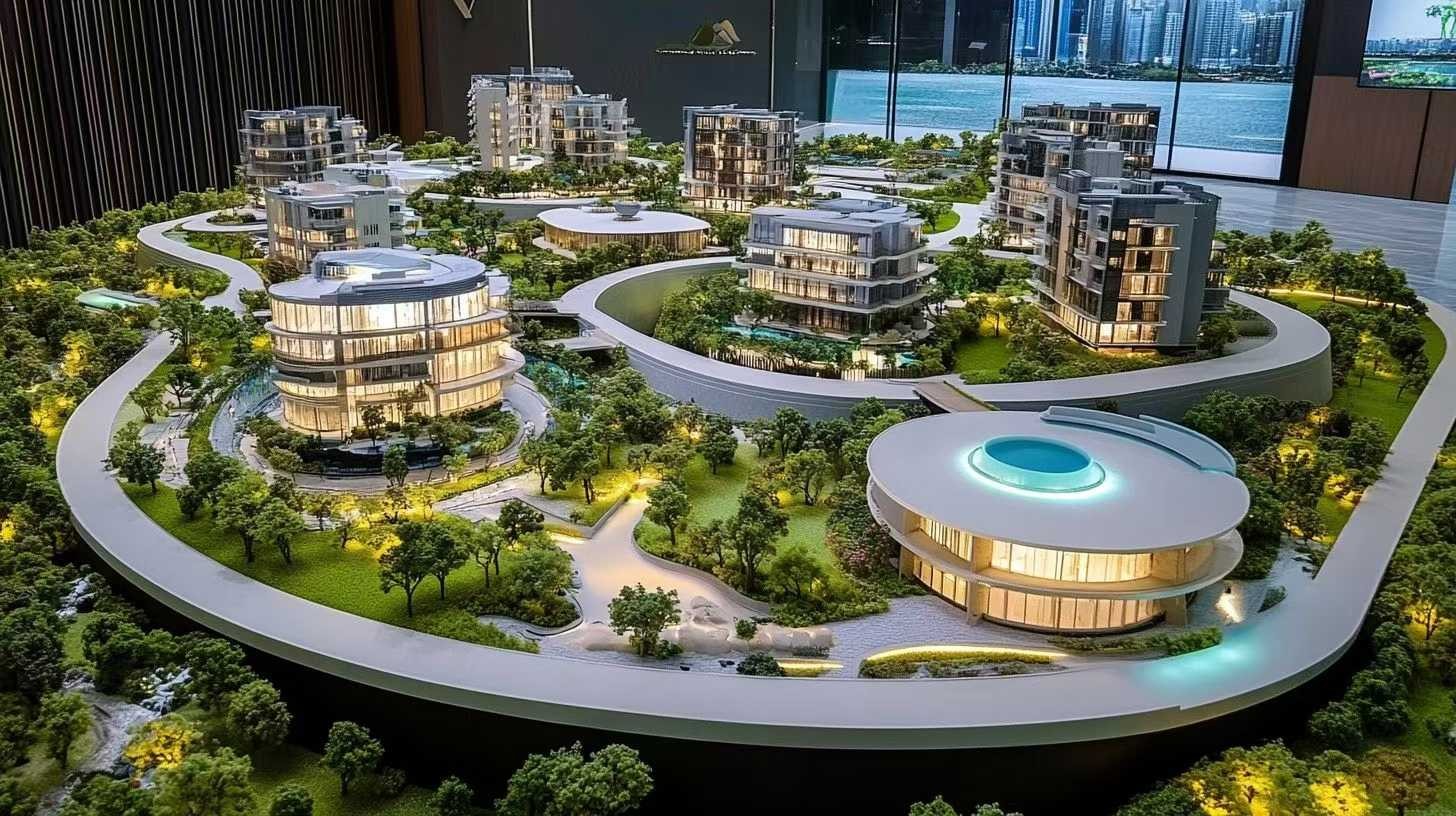
Let us break down what makes a great smart city model.
Connected Buildings
Each building has a “digital layer” – often represented by subtle LEDs or colored accents.
Smart facades with dynamic shading are shown with movable or translucent panels.
Smart Mobility Infrastructure
EV charging stations, autonomous vehicle (AV) lanes, smart traffic lights, and shared mobility hubs.
Tiny model EVs or light strips indicate autonomous routes.
Sensor Networks
Distributed dots or small fiber optic points represent air quality, noise, or occupancy sensors.
LEDs can pulse to show data collection.
Smart Grid and Energy
Solar panels, battery storage units, micro‑grid boundaries.
Glowing paths show energy sharing between buildings.
Public Wi‑Fi and Data Displays
Small kiosk models with illuminated screens.
Fiber optic rings around public plazas.
Educational Legend
A touch screen or printed panel explains each smart feature.
QR codes link to live data dashboards.
A well‑executed Smart City Building Architectural Scale Model is both a display and an interactive tool.
Materials for Smart City Models
Smart models blend traditional materials with tech components.
Laser‑cut acrylic or MDF – For building shells.
Clear acrylic – For smart glass facades.
3D printed parts – For EV chargers, sensor nodes, and kiosks.
Micro LEDs (surface‑mount) – For lighting effects.
Fiber optic strands – For data flow and sensor networks.
Thin copper tape – For hidden circuitry.
Printed vinyl overlays – For digital screen graphics.
Avoid heavy, non‑conductive materials that block LED wiring.
Use modular bases so electronics can be serviced.
The Custom Production Process: Step by Step
How is a smart city sand table model made?
Here is the typical workflow.
Step 1: Smart Technology Mapping
You provide plans and a list of smart features.
The model maker identifies where to place sensors, EV chargers, data nodes, etc.
Step 2: Base and Infrastructure
A reinforced MDF or aluminum base is cut.
Roads, EV lanes, and sensor locations are marked.
Wire channels are routed into the base.
Step 3: Building Fabrication
Buildings are laser‑cut with hollow cores for LEDs.
Smart facades use translucent acrylic.
Solar panels are 3D printed.
Step 4: Electronics Installation
Micro LEDs are soldered onto flexible strips.
Fiber optics are threaded through tiny holes.
All wiring is hidden under the base.
Step 5: Programming and Testing
LEDs are programmed to pulse, change color, or sequence.
A small microcontroller (Arduino or similar) controls effects.
Step 6: Landscaping and Labeling
Trees, streetlights, and smart kiosks are added.
A legend panel is attached or displayed on a nearby screen.
Step 7: Quality Control and Cover
The model is dusted and tested.
A clear acrylic cover with ventilation holes (for heat) is fitted.
A custom Smart City Building Architectural Scale Model typically takes 8 to 14 weeks due to electronics integration.
Applications for Smart City Models
Where are these models used?
Urban Planning Departments
Test sensor placement and data flow.
Present smart city proposals to elected officials.
Tech Company Showrooms
Demonstrate IoT platforms and smart infrastructure products.
Real Estate Marketing for Smart Districts
Attract tech‑savvy buyers and tenants.
A Real Estate Marketing Architectural Sand Model enhanced with smart features is highly effective.
University Research and Design Institutes
An Architectural Sand Table Model for Design Institute studying smart cities becomes a hands‑on teaching tool.
Public Consultations
Citizens understand sensor networks and EV infrastructure when they see them in miniature.
Case Study: Smart City Model Wins Government Grant
A mid‑sized city wanted to become a “smart city pilot.”
They needed a $10 million government grant.
They commissioned a Smart City Building Architectural Scale Model at 1:500 scale, covering a 2m x 2m downtown area.
The model showed smart traffic lights (pulsing LEDs), EV charging hubs (glowing blue), and data flow (fiber optic lines).
During the grant presentation, the model was the centerpiece.
Reviewers could touch and explore.
The grant was approved.
The model cost 10 million.
Cost Factors for Smart City Models
Number of smart features – Basic lighting vs. programmable sensors and data flow.
Electronics complexity – Simple on/off LEDs vs. microcontrollers with sequencing.
Building count – 20 buildings vs. 200 buildings.
Interactivity – Push‑buttons vs. touch screen integration.
Scale – 1:200 shows more detail but costs more than 1:500.
Typical range: 60,000 for a large, fully programmable model with interactive touch screen.
How to Choose a Model Maker for Smart City Projects
Portfolio of tech‑integrated models – Look for LEDs, fiber optics, and moving parts.
Electronics expertise – They should understand microcontrollers and low‑voltage wiring.
Experience with urban scales – 1:500 to 1:1,000.
References from smart city initiatives – Call two.
Ask for a demo of a previous model’s lighting effects.
Display Tips for Smart City Models
In a Darkened Room
Dim ambient light makes LEDs pop.
Use spotlights only on non‑lit areas.
With an Interactive Screen
A small touch screen next to the model.
Tapping a building shows its smart features.
Protective Cover with Anti‑Glare
Acrylic covers can cause reflections.
Use museum‑grade anti‑reflective glass for critical displays.
Keep Ventilated
LEDs generate minimal heat, but a sealed cover can trap warmth.
Add small ventilation slots.
Maintenance Tips
Dust the cover weekly – Microfiber cloth.
Inspect LEDs monthly – Replace any burnt‑out bulbs.
Check wiring annually – Loose connections cause flickering.
Update programming as needed – New smart features can be added.
Common Mistakes to Avoid
Do not over‑light.
Too many flashing LEDs look like a carnival, not a smart city.
Do not ignore physical context.
Smart features need streets, buildings, and public spaces to make sense.
Do not make sensors too large.
At 1:500, a sensor should be almost invisible – represent with a tiny dot.
Do not forget to label.
Viewers will not know what a pulsing blue light means without a legend.
Do not use wireless control without testing.
Wi‑Fi signals may not penetrate the model base – use wired controllers.
Integrating with Other Model Types
A smart city district includes many components.
Other model types can complement or be part of the same display.
A Tourism Resort Architectural Scale Model for a smart resort could include app‑based room keys, smart pool lighting, and autonomous shuttle paths – all representable with LEDs and fiber optics.
An Eco Park Architectural Sand Table Model with smart irrigation sensors, real‑time air quality displays, and solar‑powered lighting fits perfectly into a smart city narrative.
A Commercial Street Architectural Scale Model can be enhanced with smart parking sensors, dynamic signage, and EV charging stations – core smart retail features.
A Low Carbon Building Architectural Sand Table Model overlaps with smart city models, as many low‑carbon buildings rely on smart grids and energy management systems.
And an Architectural Sand Table Model for Design Institute studying urban technology would use a smart city model as the primary case study.
Each model type benefits from smart city thinking.
The dedicated smart city model, however, integrates all these elements into one cohesive vision.
Future Trends in Smart City Sand Table Models
Real‑time data integration – LEDs change color based on live traffic or air quality feeds.
Augmented reality overlays – Scan the model to see demographic data or energy usage.
Touch‑activated sensors – Tap a building to display its smart stats on a screen.
3D printed conductive traces – Wiring built directly into the model during printing.
Yet the core remains.
People need to see and touch the smart city to believe it.
A physical model does that best.
Conclusion
A Smart City Building Architectural Scale Model turns complex technology into an understandable, engaging display.
It helps you sell the future – to governments, investors, and citizens.
From the pulsing data flow to the glowing EV chargers, every detail tells a story of connectivity.
Choose a maker with electronics expertise.
Invest in quality LEDs and clear labeling.
If you are shaping a smart city, build a model that shows it.
Your stakeholders will see the intelligence.
Your community will embrace the vision.
And remember – whether you need a Tourism Resort Architectural Scale Model for a smart beachfront, an Eco Park Architectural Sand Table Model for a connected nature reserve, a Commercial Street Architectural Scale Model for a smart retail district, a Low Carbon Building Architectural Sand Table Model for sustainable design, or an Architectural Sand Table Model for Design Institute for education, each can be enhanced with smart features. But for the full, integrated vision of a connected city, nothing beats a dedicated smart city building scale model.


